
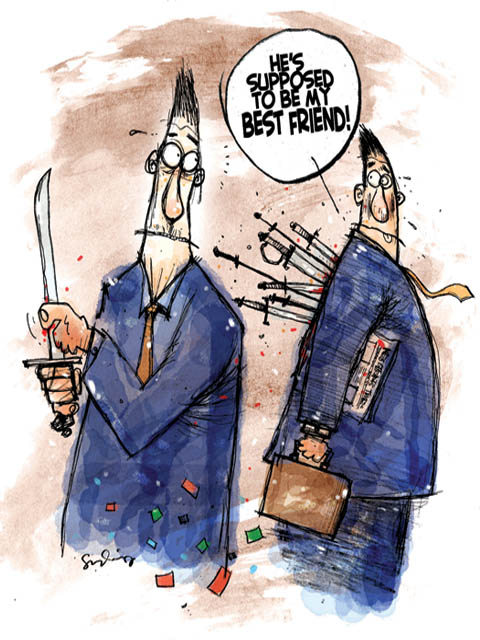
half baked new editorial cartoon. manually scan and all the shading, dirts was done in photoshop. it's about a tussle in political parties regarding seat distributions...:)




caricature of Thaksin shinawatra and Abhisit vejjajiva. Prime minister and former prime minister. Thaksin supported by red t-shirt army already plunge thailand into crisis...
done in photoshop and painter11. - its photo manipulatin + sketching...tools at your hand - depend on you how to abuse it to the max! - as i am working with newspaper that always need all graphics in speedy time - this style really help me...:)

it's about hulu selangor by - election that will be held on 21st? 25th? of april. the challenge between 4 candidates - it's a 4 cornered contest- PKR-BN and 2 independent candidates. The by-election, brought about by the death of PKR member of parliament Datuk Dr zainal Abidin Ahmad. - and in the news lat nite there is already an incidents of stone throwing ...hmmm...who hit who? or who hit themself just to get attention?:)
sketch done on A4 paper using derwent sketch pencil - scan at 200dpi - final toucup - ballon - stain was done in photoshop

rough sketch of editorial cartoons - h1n1 - swine flu issue - sketch using normal - staedtler 2B pencil on photostat paper - 70gm - scan at 200dpi - rough sketch - 15 minutes rendering.
- in progress...stage 2 - import into photoshop - applied toning and custom brush...
:)

kemelut terbaru antara MSN dan KOAM .. editorial cartoon - scan at 200dpi - all dirts remove in photoshop - all dirts and toning applied in photoshop using custom brush - splatter - free download from net. 1 hour rendering - 20minutes for raw sketch. :)


pencil sketch for the editorial . it's a monkey hand actually...donno whether my sketchs match the monkey hand. monkey with a molotov cocktail bomb in hand...

..here is the final one. enhanced in photoshop... all the toning and the dirts done using photoshop custom brush. artwork scan at 200dpi - grayscale. - i am trying to emphasize on an idiot act..stupis act when people deal with sensitive issue...although monkey also not do like this...just to say that all stupid acts - not human - it's a monkey act! - soo sorry to all monkey outside! :)

i got a chance to test new bamboo fun - from wacom. before this i use to do illustrations and photo manipulation using wacom tblet. but this time - bamboo fun - said to be more cheaper and affordable toy for amateure and pro artist.
installation the driver as easy as plu and play. the tutorial very helpfull. tbe boxset package also very nice - once you touch the box - you can feel that you are now a real pro digital artist!

- the tutorial that easy to follow!
for experience or new user are advice to going through the tutorial fist before start to use bamboo. and alert about what do and don'ts while using it.
bamboo has a sleek design fit on small work area. to add more ...it also let user sets whether to work on left or rigt handed.. its cool for left handed artist like me.
pen active area size of 217 x 137mm, is big enough for you to do any illustrations and photo manipulation. its work best with Adobe Photoshop Elements 6 (Mac) and 7 (PC) and Corel Painter Essentials, Artrage2.5 .
the pen is very pressure sensitive. just select the type of brush you want to use. and its work lie you want it to be...
the pen allows you to navigate through the screen, double-click (by tapping once/twice with the pen tip), right click (by pressing the upper pen button), pan and scroll (by pressing the lower pen button and sliding the pen), and write. The pen is very accurate and allowed me to create sketches on Corel Painter Essentials 4 , photoshop or artrage without any problems.
- slowly - step by step - i am paperless now! - start doing illustrations from the scratch using artrage2.5 and then import into photoshop for enhancement and for more variety of brush..and the final output is really2 great! - like doing it on paper! sometimes it do more great jobs!

-sample of my artwork that i do 100% using bamboo. now you can see what i mean i am paperless now! :)
new feture to highlight is its ability to recognise multi-touch gestures. by touching the tablet surface, you can move the cursor around the screen, select files or folder, and drag it.
If you have bulk of photos to look at, you can easily scroll through them by putting two fingers on the tablet and move your hand to the left or right. You can also zoom in or out by expanding or pinching your fingers or rotate it by placing your fingers 45 degrees and rotate your hand.
-it's like the feature on iPhone! - but i phone got an apps that could do illustration with your finger. hope next generation bamboo will bring this feature along.
This bamboo is useful and work great with apps for graphic programs such as Photoshop , painter, artrage or illustrator (just to name a few).
the bamboo works great for users who want to use the tablet for photo manipulation or start doing illustrations from scratch.
And now it also got touchscreen feature! -forget about buying new touchscreen monitor!:) and from what i heard the price is soooo affordable for all and it bundles with good usefull software - photoshop and painter essentials.
if not the same as Cintiq models ( which is so expensive for amateur artist like me!)- i already can feel the aura of cintiq while doing illustrations using bamboo!
i test this cute bamboo for almost 2 weeks with my daily task as an illustrator - what i can say is - it's great, really! with the competitive prive - the sleek design - pressure sensitive pen - good bundle software. i recommend you to get it now!!! :)
sudin-mystudio69